Basic Circuit Simulator - A Simple Print Circuit Board and Diagram Editor
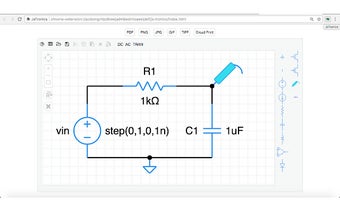
Basic Circuit Simulator is a free Chrome add-on developed by New-UlmDesign. It is a versatile program that serves as both a circuit simulator and a diagram editor. With its clean user interface, users can easily create and edit circuit diagrams and print circuit boards.
One of the main features of Basic Circuit Simulator is its drag and drop functionality, allowing users to easily place diagram symbols on the canvas. Symbols can be edited by double-clicking on them, making it simple to customize properties. Users can also extend the extremities of symbols to draw lines and build their circuits.
The program offers three simulation modes: DC, AC, and Transient Analysis. Users can validate and simulate their circuits by pressing the corresponding buttons. Additionally, Basic Circuit Simulator allows users to export their projects in PDF, PNG, JPG, GIF, and TIFF formats, making it easy to share and print their designs.
Another useful feature is the ability to cut, copy, and paste symbols within the canvas, as well as the option to select multiple elements and symbols with the mouse. For those looking for online functionality, Basic Circuit Simulator introduces the Cloud Print button, which allows users to export projects to Google Drive as PNG files.
Overall, Basic Circuit Simulator is a valuable tool for both beginners and experienced circuit designers. Its intuitive interface, drag and drop functionality, and simulation capabilities make it a versatile program for creating and validating circuit diagrams.